Showing posts with label WINDOWS SOLUTION. Show all posts

Sunday, December 21, 2014

How to change Windows password without old password using CMD

If you forgot old password of your Windows PC then you would not able to change new password. So you can't protect your PC from others. That's why I post this simple trick. It is very very easy method and no need download any third party software. use only comment prompt (CMD). just  follow the instructions below.



Instructions:
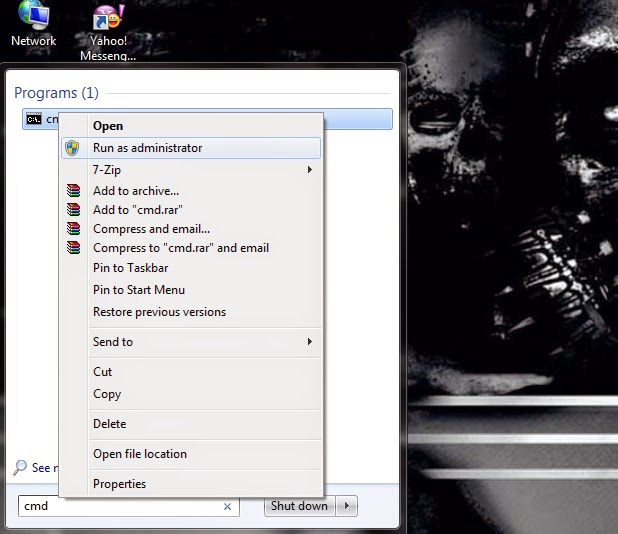
1. open your Windows PC and search CMD (all in caps).

2. Windows 8 users search using Windows key + W.

trickmasterzone.blogspot.com

3. Right click on CMD and select Run as administrator then select Yes.
trickmasterzone.blogspot.com

4. type the following keywords in the opened CMD window.
               
                  net user USERNAME 12345

5. where USERNAME is your username 12345 is your new password.

trickmasterzone.blogspot.com

6.If you are using many users you can change the comment with your username which you want to change. 

7. That's it your password will be changed.

How to solve auto exit (close) softwares or games in Windows pc

trickmasterzone.blogspot.com
Some softwares or games after few minutes automatically closed or exited while running. This problem is mostly available in windows pc while playing high capacity games. So I post this solution for that problem.
It is easy method to solve that problem no need any softwares. Just follow the Instructions below.


Instructions:

1. Right click on Computer icon and select properties.

2. then select Advanced system settings at the left side of the opened window.

trickmasterzone.blogspot.com

3. And then select Advanced tab in the new window.

4. select settings in performance box.

trickmasterzone.blogspot.com

5. Then select Data Execution Prevention tab.

6. select Turn on DEP for all programs and services except those I select:

trickmasterzone.blogspot.com

7. then click Add button at the below of that new window.

8. then select your auto closed exe file then click open it will be appeared in the execution list .

9. click Apply and OK.

10. Once Restart your pc then show the problem was solved.